
Section 1
How long does it take to implement a VR lab?
Up to 15 calendar days to go live. iXRLabs follows a seven-stage rollout. When projects slip, it is almost always in the early stages (approvals, Wi-Fi, accounts), never the hardware.
The seven-stage rollout
Leadership buy-in
Secure one academic champion and agree clear, measurable objectives.
Curriculum mapping
Map modules to courses, learning outcomes and accreditation criteria (NBA, NAAC, ABET and others).
Infrastructure setup
Size the fleet and room around real batch sizes and timetable slots, not total enrolment.
Faculty orientation
Hands-on training, then the first live class with our team on hand.
Classroom integration
Embed VR into the lesson with a brief, simulate, debrief structure.
Monitoring and review
Track sessions, usage and feedback through monthly analytics.
Expansion and scale
Extend the same fleet to more departments and document outcomes as case studies.
A deeper walkthrough of each stage is on our blog: How to implement a VR lab in higher education: a practical 7-stage framework.
What the lab runs on
- A cloud content and admin layer
- App or browser-based distribution (WebXR)
- Standalone headsets such as Meta Quest 3S
- Optional facilitator laptop and casting display
No on-premises server. No high-end workstation. Installed modules run offline.
Six things that decide the 15 days
- Headsets available on site
- Wi-Fi ready in the room
- Platform accounts created
- Module subscription signed off
- A designated administrator
- Acceptance testing done on time
Want to test first? Run a 30-day proof of concept
A representative module set, platform access, remote onboarding, basic faculty training and an evaluation checklist agreed with you in advance.
Section 2
How many VR headsets do you need?
Most departments start with 5–10 headsets. Size the fleet against your largest single lab group, not your total enrolment. Five headsets serve 20 students in a 90-minute slot or 30 in a 2-hour slot, and twice that with paired working.
The arithmetic is simple. A lab slot loses about 30 minutes to briefing, fitting headsets and the debrief. The rest is split into rotations of one module each. Every headset serves one student per rotation, or two when students work in pairs.
| Lab group size | Headsets, solo | Headsets, paired |
|---|---|---|
| 20 students | 5 | 3 |
| 30 students | 8 | 4 |
| 40 students | 10 | 5 |
| 60 students | 15 | 8 |
| 80 students | 20 | 10 |
Two levers bring these numbers down further. Longer slots: a 2-hour slot needs about a third of the hardware of a 1-hour slot, because it fits six rotations instead of two. Paired working: two students per headset halves the fleet.
Plan your rotation
Enter your largest lab group. The planner uses the same model as the table above.
Section 3
Do 60 students need 60 headsets? No.
A 60-student batch can run on as few as 5 headsets. Students take short 10–15 minute turns in VR while the rest of the class works at analysis desks. With a 2-hour slot and paired working, 5 headsets × 2 students × 6 rotations = 60 students.
One-headset-per-student is how a VR lab gets over-budgeted. In practice, VR is one station inside a lab session, the same way a single expensive instrument is shared in a physical lab. These are the four models institutions use, often in combination.
Station rotation
The class splits into small groups. One group is in the VR bay; the others work on lab sheets, calculations or the physical rig, then swap.
Best for: standard lab slotsPaired working
Two students share a headset. One works in VR while the partner follows the cast feed and records observations, then they swap or discuss.
Best for: halving the fleetSplit batch
A large batch is timetabled as smaller lab groups across the week. The fleet is sized for one group, then reused for each.
Best for: batches of 60+Demo plus turns
Faculty cast one headset to the room display to teach the concept, then students take short individual turns to explore it themselves.
Best for: tutorials and lecturesClassroom deployment examples
Five realistic set-ups, with the arithmetic shown so you can adapt them.
60 mechanical engineering students, one 2-hour lab
Paired working, 15-minute module, whole batch in one slot
- 0–15 min: faculty briefs the whole class using the cast display.
- 15–105 min: six rotations of 15 minutes. Ten students (five pairs) are in the VR bay each rotation; the other 50 complete the lab sheet at analysis desks.
- 105–120 min: class debrief on what students observed.
60 students split into three lab groups of 20
Solo use, 90-minute slots across the week
Many engineering and science batches are already divided into lab groups. Each group of 20 gets its own 90-minute slot (for example Monday, Wednesday and Friday), and every student gets an individual 15-minute turn.
5 headsets × 1 student × 4 rotations = 20 students per slot, 3 slots = 60For the same batch in a single 90-minute slot with solo use, you would need 15 headsets. Splitting the batch reaches everyone with a third of the hardware.
40-student practical with a VR pre-lab
10-minute walkthrough before the physical rig, same slot
Students work in eight rig groups of five. Just before its turn at the physical equipment, each group puts on the headsets for a 10-minute walkthrough of the apparatus and procedure. All eight groups pass through in 80 minutes, inside a standard 3-hour practical.
8 groups × 10 minutes = 80 minutes of VR, no timetable change120-student physiology cohort in tutorial groups
Paired working, 1-hour tutorial slot, 15-minute module
The cohort is already split into six tutorial groups of 20. In each one-hour tutorial, the tutor demonstrates on the cast display, then pairs take two rotations in VR.
5 headsets × 2 students × 2 rotations = 20 students per tutorial, 6 tutorials = 120One shared fleet across three departments
Mechanical, civil and health sciences on one timetable
A fleet sized for one department’s peak batch sits idle most of the week. Sharing it turns a cost line into an institutional asset. A typical week:
- Monday–Tuesday: mechanical labs (CAD visualisation, assembly and disassembly, kinematics)
- Wednesday: civil labs (BIM at 1:1 scale, structural systems, construction sequencing)
- Thursday: physiology and anatomy tutorials
- Friday: open practice, research cohorts and faculty preparation
Section 4
Do you need a new room? No, a reconfigured computer lab works.
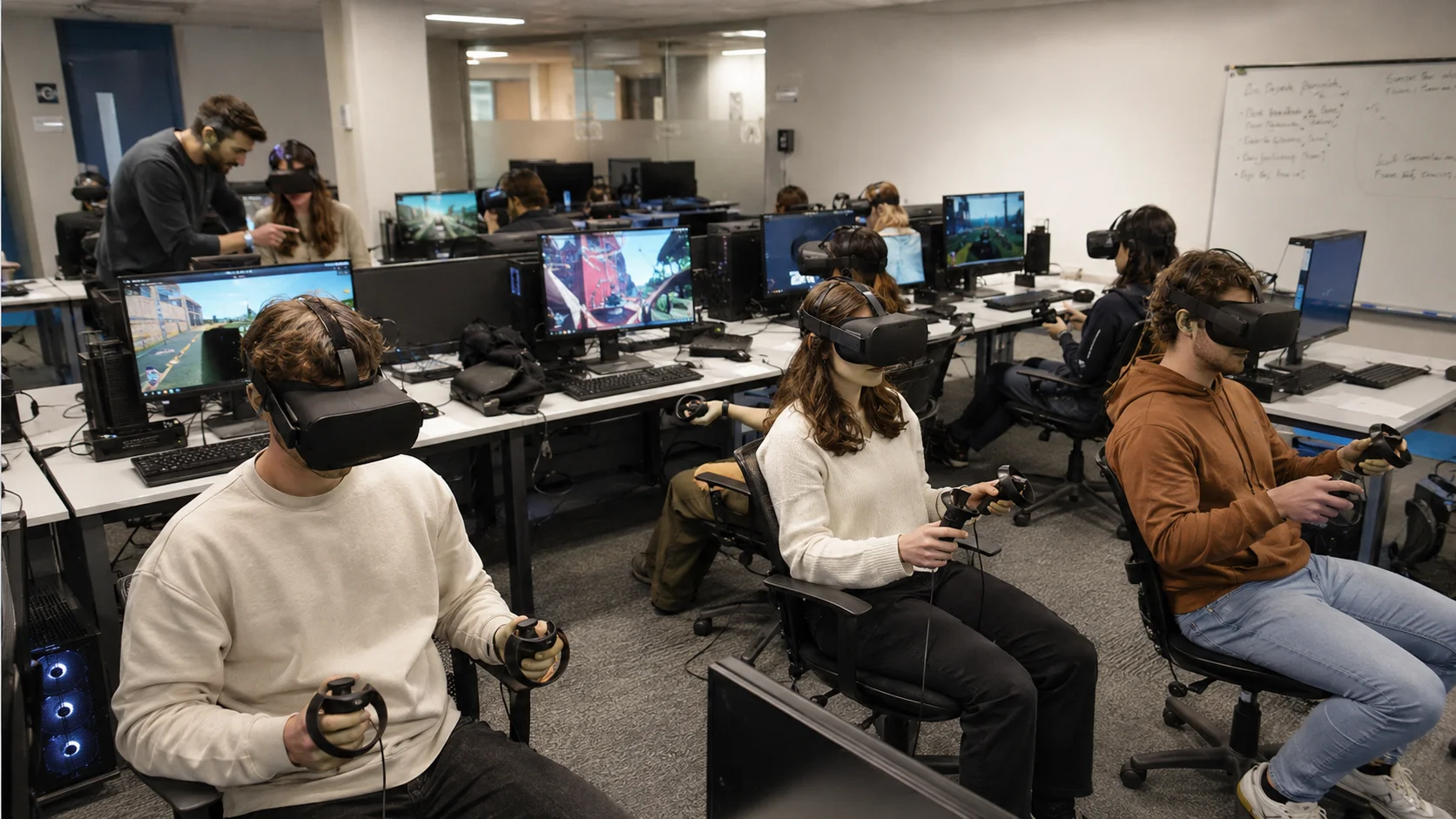
Five seated VR stations fit in about 30 m²; ten fit in about 45–50 m². Most institutions already have the room: an existing computer lab or seminar room with power and Wi-Fi. No construction, no dedicated building, no workstation upgrade.
- AVR baySeated stations with about 2 m × 2 m clear space each.
- BCharge and hygieneCharging rail, wipes and spare face interfaces.
- CCast and debriefLaptop and display mirroring one headset feed for the class.
- DAnalysis desksWhere students not in a headset work. This is what makes rotation possible.
Three ways VR fits your existing timetable
Lab-slot swap
Replace one experiment with its VR equivalent. No timetable change. The recommended starting point.
Pre-lab walkthrough
A 10-minute VR walkthrough before the physical rig, inside the existing slot.
Tutorial hour
One recurring slot to visualise mechanisms students can’t see on a page or board.
Across engineering, health sciences and applied sciences, the pattern is consistent: standalone headsets added to an existing teaching space, with students rotating in small groups through the standard lab period. Where a GPU workstation lab already exists, some institutions run PC-VR at near one-to-one coverage instead. See how this looks in practice in our case studies.
Section 5
What must faculty learn, and how long does it take?
A few hours for basic operation, 3–4 live sessions to run a class confidently. Modules are ready to run, so faculty launch content rather than build it. There is no authoring burden in the first semester, which is when adoption usually stalls.
A few hours
Basic operation, covered in one onboarding session.
1–2 weeks
Running a class confidently, after 3–4 live sessions.
About 1 semester
Full pedagogical fluency: redesigning how a topic is taught.
What faculty newly learn
Running a session
Fitting and sanitising headsets, launching modules and monitoring 30+ students live from the dashboard.
Teaching differently
Letting students explore 3D models rather than lecturing at a 2D board.
Visualising spatial concepts
Showing internal geometries and mechanisms that are hard to convey on a screen.
Mapping to assessment
Aligning modules to lab manuals, viva questions and internal assessment.
Authoring custom content is optional, for faculty champions who want it. It is never required. The 7thi AI tutor inside every module also answers student questions in the headset, so one faculty member can supervise a full rotation.
Section 6
What do you get beyond the classroom? Publishable data.
A VR lab produces research data from the first semester. A pre/post student survey is enough for a pedagogy paper comparing VR with traditional labs. No extra apparatus is needed.
Pedagogy papers
VR versus traditional labs on learning outcomes, retention and engagement, using pre/post surveys.
Domain papers
New VR-based methods for teaching design, BIM, simulation or physiology, in the discipline’s own journals.
Evidence already in the field
Student responses across two cohorts (n = 56) on a 5-point scale, peer-reviewed in Physiology, Vol. 41, Issue S1 (American Physiology Summit 2026).
Source: DOI 10.1152/physiol.2026.41.S1.2299577. Related deployment: Mälardalen University case study.
Who does what: iXRLabs provides validated curriculum-aligned content, platform usage analytics and support with study design. Faculty bring the domain expertise and the cohort.
FAQs
Questions institutions ask before they buy
How long does it take to set up a VR lab at a university?
Up to 15 calendar days to go live with iXRLabs, once headsets, Wi-Fi access and a named administrator are in place. The rollout follows seven stages, from leadership buy-in to expansion. Delays almost always come from the prerequisites, not the hardware.
How many VR headsets does a classroom need?
Most departments start with 5 to 10 headsets. Five headsets serve 20 students in a 90-minute lab or 30 students in a 2-hour lab with a 15-minute module, and twice that with paired working. Size the fleet against your largest single lab group, not your total enrolment.
Do 60 students need 60 VR headsets?
No. Students rotate through the headsets in short 10–15 minute turns while the rest of the class works at analysis desks. A 60-student batch can be served by 15 headsets in a 90-minute slot, 10 headsets in a 2-hour slot, or just 5 headsets in a 2-hour slot with paired working (two students per headset).
What is paired working in a VR lab?
Two students share one headset during a rotation: one works in VR while the partner follows the cast feed, reads the lab sheet and records observations, then they discuss the result. Paired working doubles the number of students each headset serves.
Do we need a dedicated room or new building for a VR lab?
No. Most institutions reconfigure an existing computer lab or seminar room with power and Wi-Fi. Five seated VR stations fit in about 30 m² and ten in about 45–50 m².
Do we need a server or high-end PCs to run iXRLabs?
No. iXRLabs uses a cloud content and admin layer with standalone headsets such as Meta Quest 3S. There is no on-premises server and no high-end workstation, and installed modules run offline. A facilitator laptop and casting display are optional.
How long does faculty training take?
Basic operation takes a few hours in one onboarding session. Faculty usually run a class confidently after 3–4 live sessions (1–2 weeks), and reach full pedagogical fluency in about one semester. Modules are ready to run, so faculty launch content rather than build it.
How does a VR lab fit into an existing timetable?
Three ways, none of which require a new timetable: swap one physical experiment for its VR equivalent, run a 10-minute VR walkthrough before the physical rig inside the same slot, or use one recurring tutorial hour to visualise concepts that are hard to see.
Can one set of VR headsets be shared across departments?
Yes. A fleet sized for one department’s peak batch is idle most of the week. Sharing the same headsets across two or three departments, such as mechanical, civil and health sciences, raises utilisation and shortens payback.
Is there a trial before a full VR lab purchase?
Yes. iXRLabs offers a 30-day proof of concept with a representative module set, platform access, remote onboarding, basic faculty training and an agreed evaluation checklist.
Can faculty publish research using a VR lab?
Yes. A pre/post student survey is enough for a pedagogy paper comparing VR with traditional labs, and faculty can also publish domain papers on new VR-based teaching methods. iXRLabs provides curriculum-aligned content, usage analytics and study-design support.