
VR Module · Mechanical & Aerospace · Engineering
Turbofan Jet Engine - VR module.
Explore a turbofan engine as a working system in VR - take it apart, run its full cycle, watch CFD-style airflow, map every stage to the Brayton cycle, and vary parameters on a virtual test bench.
See it
Module media.
Learning objectives
By the end of this module, students will be able to:
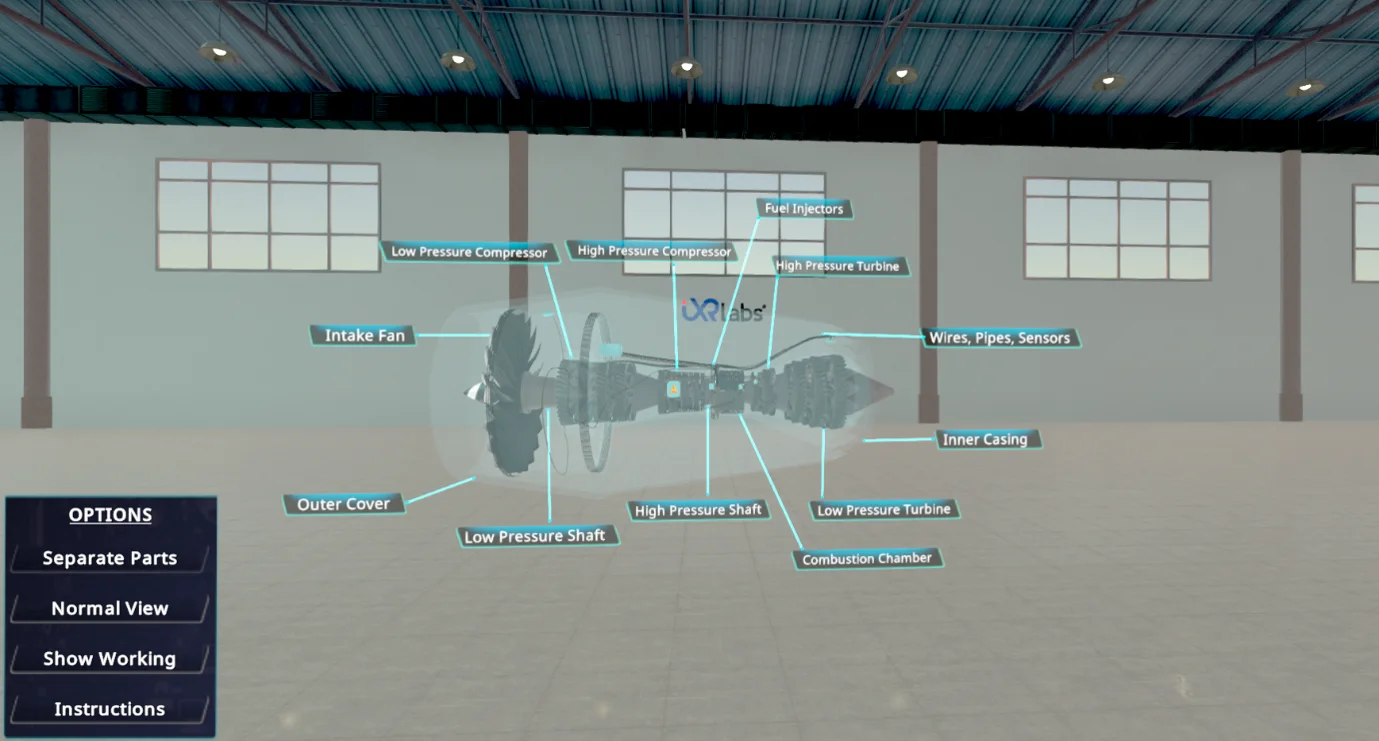
Identify the major components - fan, compressor, combustor, turbine, shaft, nozzle, and bypass duct
Explain the function of each component and how energy transfers across the engine stages
Describe the complete working from air intake to thrust generation
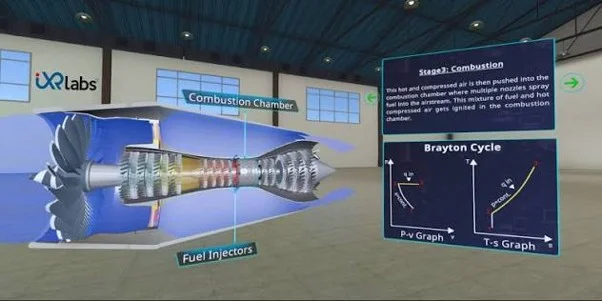
Correlate engine operation with the Brayton cycle - compression, combustion, expansion, exhaust
Interpret airflow, pressure, temperature, and velocity changes from CFD-style diagrams
Experiment on the test bench and observe changes in thrust, efficiency, and pressure ratio
About the module
A turbofan you can take apart and run.
A turbofan is an air-breathing engine that compresses incoming air, burns a portion of it with fuel, and drives the turbine with the hot exhaust to produce thrust. Most of that thrust comes from the large front fan and its bypass airflow - what makes turbofans efficient for high-speed aircraft.
Students don't just look at a static 3D object. In Assembly / Disassembly Mode they separate and inspect every component; in X-Ray View internal airflow paths and rotating assemblies become visible without dismantling; in Working Mode the full cycle is animated - intake, compression, combustion, turbine rotation, exhaust, and thrust.
A CFD visualisation layer shows airflow, pressure zones, and temperature variation across fan, compressor, combustor, turbine, and nozzle, all mapped directly to the Brayton cycle. In Simulation / Test Bench Mode learners vary operating parameters and watch performance respond - turning the model into virtual experimentation, lab demonstration, and pre-/post-lab assessment.
The 7thi AI tutor sits alongside the whole experience, scaffolding the difficult parts and giving subject-aware answers in context. Built-in assessment lets faculty see, per student, who has grasped which concepts - without grading another paper.
ABET (United States)
Supports ABET Student Outcome 1 - identifying and formulating engineering problems in thermodynamic cycles, engine performance, and propulsion - and Outcome 6 through simulation-led experimentation and data interpretation. Detailed mapping available on request.
AICTE / NEP 2020 (India)
Mapped to Mechanical Engineering Thermodynamics, Applied Thermodynamics, Thermal Engineering, and propulsion units, supporting experiential, visualisation-led, competency-based learning aligned with NEP 2020.
University syllabi
We map this module to your institution's own Mechanical, Aerospace, or Thermodynamics syllabus - paper codes, unit numbers, and course outcomes - before deployment.
NBA (India)
Maps to Course Outcomes in Applied Thermodynamics, Thermal Engineering, and Propulsion Systems, contributing to POs around engineering knowledge, problem analysis, and modern tool usage (especially PO5).
Get this module
Included in these iXRLabs packages.
Mechanical Engineering
CoreMechanical VR modules - thermodynamics, propulsion, machines, manufacturing, and materials.
Complete Engineering
All disciplinesThe full engineering library - 240+ modules across mechanical, civil, and electrical, including the Turbofan Jet Engine.
Custom rollout
QuotePick specific modules, devices, and seat counts. We'll scope a deployment for your department.
7thi and assessment in this module
7thi in this module
Students can ask 7thi questions at any point - about thermodynamics, the Brayton cycle, or anything they see in the simulation. 7thi answers in context, without breaking the flow.
Assessment
Session data - concepts mastered, time per scene, assessment scores - appears on the faculty dashboard. Export to your LMS via xAPI.
Keep exploring
Related engineering modules.
What prior knowledge do students need?
A foundation-level understanding of thermodynamics and the Brayton cycle helps. Suitable for UG Year 2 and above in Mechanical or Aerospace Engineering.
How long is a typical session?
About 45 minutes for a full run including assessment. Students can pause and resume, and faculty can assign specific parts rather than the whole module.
Can this be used in a flipped classroom?
Yes. Students complete the VR module before the lecture, so class time focuses on analysis and discussion.
Is the assessment graded automatically?
Yes. Assessment scores appear on the faculty dashboard immediately. Faculty can adjust pass thresholds and export results to their LMS.
Which headsets is this module optimised for?
Meta Quest 2 / 3 / Pro, ClassVR, Pico, and any WebXR-compatible browser. It also runs in desktop browsers without a headset. We also support the Meta XR SDK, OpenXR, and any 6DOF headset.
See the Turbofan Jet Engine module live in a demo.
Thirty minutes, the full module, your curriculum questions answered.