
VR Module · Mechanical - Aerospace - Energy · Engineering
Gas Turbine
Gas Turbines - Brayton Cycle - Turbomachinery
See it
Inside the module.
Learning objectives
By the end of this module, students will be able to:
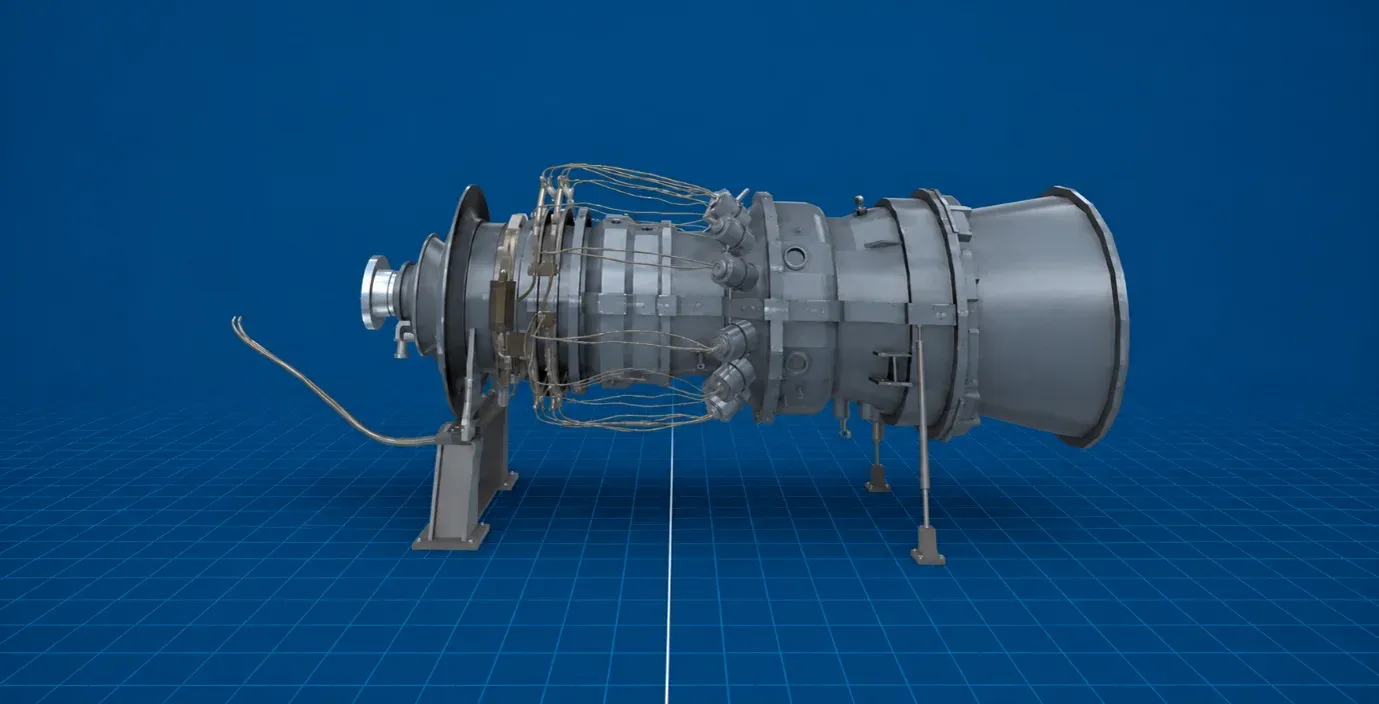
Identify the major components - compressor, combustion chamber, turbine, shaft, casing, nozzle, bearings, and auxiliaries
Explain how energy transfers through compression, combustion, and turbine expansion
Correlate each Brayton-cycle process with the working stages of a gas turbine
Interpret airflow, pressure, temperature, and velocity variations from CFD-style diagrams
Experiment with pressure ratio, turbine inlet temperature, mass flow, and load on the test bench
Understand compressor surge and stall - their causes, symptoms, and impact on performance
Explain gas turbine starting mechanisms, ignition, and acceleration to self-sustaining speed
Relate blade cooling and blade design to gas turbine efficiency and reliability
A gas turbine you can run, push, and stall - safely.
A gas turbine converts high-temperature, high-pressure gas into useful mechanical power or thrust - compressing incoming air, adding heat through combustion, and expanding the hot gases through a turbine. They power aircraft, power stations, ships, oil and gas systems, and industrial drives.
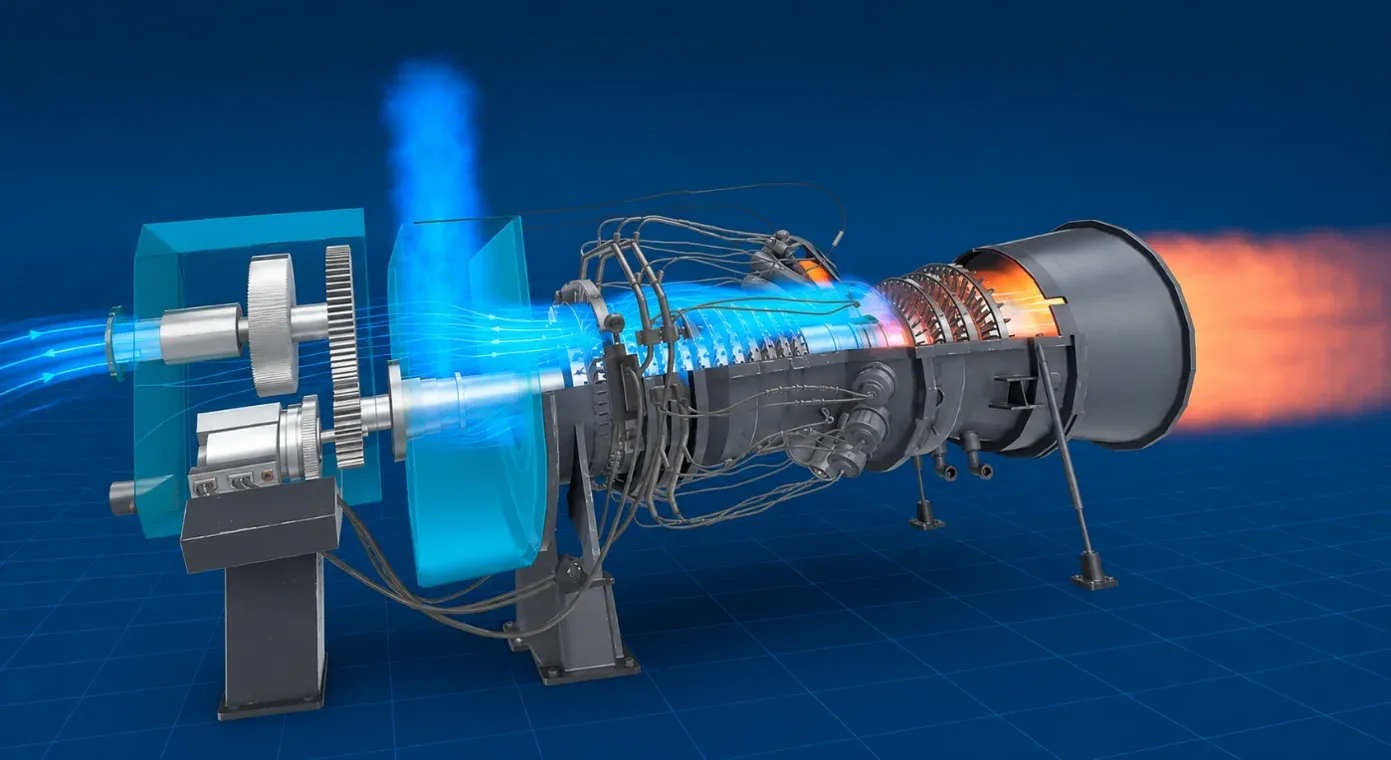
Students interact with a complete machine rather than a static diagram. In Assembly / Disassembly Mode they separate and inspect each component; X-Ray View exposes compressor stages, the combustor, turbine blades, shaft, and casing; Working Mode animates the full cycle - intake, compression, fuel injection, combustion, turbine expansion, exhaust, and shaft power.
A CFD layer reveals flow behaviour, pressure zones, temperature rise, and the combustion region, all mapped to the Brayton cycle. In the Simulation / Test Bench Mode - a virtual test cell - learners vary parameters and study performance trends, operating limits, efficiency, output power, and abnormal conditions.
Why a virtual gas turbine?
- Surge and stall are the concepts students most need to understand and the ones nobody will demonstrate on real hardware.
- Compressor stages, combustor and blade rows are buried inside the casing and never seen in operation.
- The starting and ignition sequence up to self-sustaining speed is a process, not a diagram.
- A test bench lets students push the machine to its limits with no consequence beyond a restart.
Components you can inspect
- Multi-stage axial compressor
- Combustion chamber
- Turbine and blade rows
- Shaft, casing, and bearings
- Nozzle and exhaust
- Auxiliaries and the starting system
Concepts it makes tangible
- The Brayton cycle - intake, compression, combustion, expansion, exhaust
- Energy transfer through compression and turbine expansion
- Compressor surge and stall - causes, symptoms, and impact
- Starting, ignition, and acceleration to self-sustaining speed
- Blade cooling, materials, and blade design
- Airflow, pressure, and temperature from CFD-style views
Modes of interaction
- Assembly / Disassembly to separate and inspect each part
- X-Ray View exposes stages, combustor, and blades
- Working Mode animates the full cycle
- Simulation / Test Bench varies parameters and studies limits
How faculty use it
- Pre-lecture primer on turbomachinery and the Brayton cycle
- Flipped classroom - run the machine before class
- Safe study of surge, stall, and abnormal operation
- Assessment of components, cycle, and performance
Crucially, the module makes the hard-to-visualise concepts tangible: compressor surge and stall, starting and ignition sequences, and why blade cooling, materials, and aerodynamic profile are critical at extreme temperatures. The 7thi AI tutor scaffolds the difficult parts in context, and built-in assessment shows faculty who has grasped which concepts - without grading another paper.
How the module works
Students disassemble a gas turbine into its multi-stage axial compressor, combustion chamber, turbine and blade rows, shaft, casing, bearings, nozzle and auxiliaries, then run it. The working mode animates the Brayton cycle and visualises the airflow the casing normally hides. Crucially, a test-bench mode lets students study surge and stall - seeing the causes, the symptoms and the effect on the machine - and follow the starting, ignition and acceleration sequence up to self-sustaining speed. They can push the machine to its limits with no consequence beyond a restart, which is impossible on real hardware.
What students take away
A student can identify the components of a gas turbine and explain how the Brayton cycle drives it, describe compressor surge and stall and what causes them, and walk through the starting sequence as a process rather than a specification. They understand why turbine inlet temperatures force the blade cooling and material choices that make the machine possible - the engineering compromises at the heart of turbomachinery.
In the classroom
Turbomachinery and power courses use the module to teach the behaviour students most need and can least safely see on real hardware. Surge and stall, the starting sequence and the internal airflow are all explored on a virtual test bench where the machine can be pushed to its limits without consequence. It serves as a flipped-classroom primer on the Brayton cycle and as a lab-free resource for programmes without turbomachinery rigs.
Interactive features and modes
Students can disassemble the machine, use X-ray views of the compressor stages and blades, run an animated Brayton cycle, and use a test-bench mode to study surge, stall, starting and blade cooling. The test bench is the heart of the module: it lets students push the machine into regimes that no real rig would be taken to deliberately, see what happens, and recover with a restart.
Why it matters
Gas turbines power aircraft, ships, pipelines and a growing share of the electricity grid, and they behave in ways students most need to understand and nobody will demonstrate on real hardware. Surge and stall can wreck a machine, so no lab induces them deliberately; the compressor stages, combustor and blade rows are buried inside the casing; and the start-up sequence is a process, not a diagram. A virtual test bench lets students see the dangerous behaviour safely, repeatedly, and in full.
The bigger picture
Gas turbines operate at the edge of what materials can withstand: turbine inlet temperatures exceed the melting point of the blade alloys, so blade cooling, material selection and aerodynamic design are not refinements but the very things that make the machine possible. And the failure modes that matter most, surge and stall, are precisely the ones no lab will demonstrate on real equipment. A virtual test bench lets students see the machine pushed into those regimes and recover, building an understanding of operating limits that is otherwise reserved for people who have damaged real hardware.
Devices, deployment and assessment
Deploying the module is straightforward. It runs on Meta Quest, ClassVR and Pico headsets, on WebXR-compatible browsers, and on the desktop without any headset at all, so a department can start with the hardware it already has and scale as it grows. Faculty can assign the whole module or specific scenes, set it as pre-lab preparation or post-lab revision, and track progress on a dashboard that records concepts mastered, time per scene and assessment scores, with export to the LMS via xAPI. The 7thi AI tutor answers student questions in context throughout, so learners are never left stuck and faculty are not fielding the same question forty times.
Who this module is for
- Mechanical, aerospace and energy undergraduates from Year 2 studying turbomachinery
- Power plant and combined-cycle engineering courses
- Diploma and polytechnic mechanical programmes
- Faculty teaching the Brayton cycle who want a machine to point at
Syllabus alignment
Where this module fits.
ABET (United States)
Supports ABET Student Outcome 1 - solving engineering problems in thermodynamic cycles, gas turbine performance and compressor behaviour - and Outcome 6 through test-bench experimentation and engineering judgement.
AICTE / NEP 2020 (India)
Mapped to Thermodynamics, Applied & Thermal Engineering, Power Plant Engineering, Gas Turbines, and propulsion units, supporting experiential, multidisciplinary, competency-based learning aligned with NEP 2020.
Washington Accord (IEA graduate attributes)
Supports engineering knowledge, analysis, experimentation, and modern tool usage through Brayton-cycle correlation, virtual test-bench analysis, and visualisation of blade design, cooling, surge, and stall.
NBA (India)
Maps to Course Outcomes in Applied Thermodynamics, Thermal Engineering, Power Plant Engineering, and Propulsion Systems, contributing to POs around engineering knowledge, investigation, and modern tool usage (especially PO5).
Keep exploring
Related modules.
See Gas Turbine live in a demo.
Thirty minutes, the full module, your curriculum questions answered.
Does the module cover compressor surge and stall?
Yes, and it is one of the main reasons the module exists. Students see the causes, the symptoms and the impact on the machine - behaviour no department would deliberately induce on real hardware.
What components can students inspect?
The multi-stage axial compressor, combustion chamber, turbine and blade rows, shaft, casing and bearings, nozzle and exhaust, plus the auxiliaries and starting system.
How is the starting sequence taught?
Students follow starting, ignition and acceleration up to self-sustaining speed as a sequence rather than a specification, which is where most textbook treatments stop.
Why does the module emphasise blade cooling and materials?
Because turbine inlet temperatures exceed the melting point of the blade alloy, so cooling design, material choice and aerodynamic profile are what make the machine possible at all.
Does it integrate with our LMS?
Yes. Moodle, Canvas and Blackboard are supported, with SSO and xAPI export of session data and assessment results.
How does this fit alongside lectures?
Most departments use it as a primer before the lecture or as revision after it, so class time is spent on analysis rather than first exposure to the machine.
What prior knowledge do students need?
Foundation-level gas turbines. The module suits UG Year 2+ and above, including diploma and polytechnic cohorts.
How long is a typical session?
About 45 minutes for a full run including assessment. Students can pause and resume, and faculty can assign specific parts rather than the whole module.