
VR Module · Civil · Engineering
Bridge Construction
Construction Engineering
See it
Inside the module.
Learning objectives
By the end of this module, students will be able to:
Sequence the major stages of bridge construction
Identify foundations, piers, girders, and deck elements
Explain load paths through the structure
Relate construction method to structural behaviour
Complete a scaffolded assessment on bridge construction
A bridge you can build, stage by stage.
Construction sequence is hard to teach on paper. This module lets students build a bridge in the correct order - foundations, piers, girders, and deck - and see why sequence matters.
As the structure goes up, students trace load paths and understand how each element carries and transfers force.
Why teach bridge construction in VR?
- Construction sequence is a time-based idea. A static drawing cannot show a structure becoming stable stage by stage.
- Live bridge sites are rarely accessible to a full cohort, and never at the moment a particular stage is being built.
- Load paths are invisible on site, but can be highlighted, animated and re-run as often as a student needs.
- Temporary works have usually been struck and removed long before any class arrives.
Stages you build and inspect
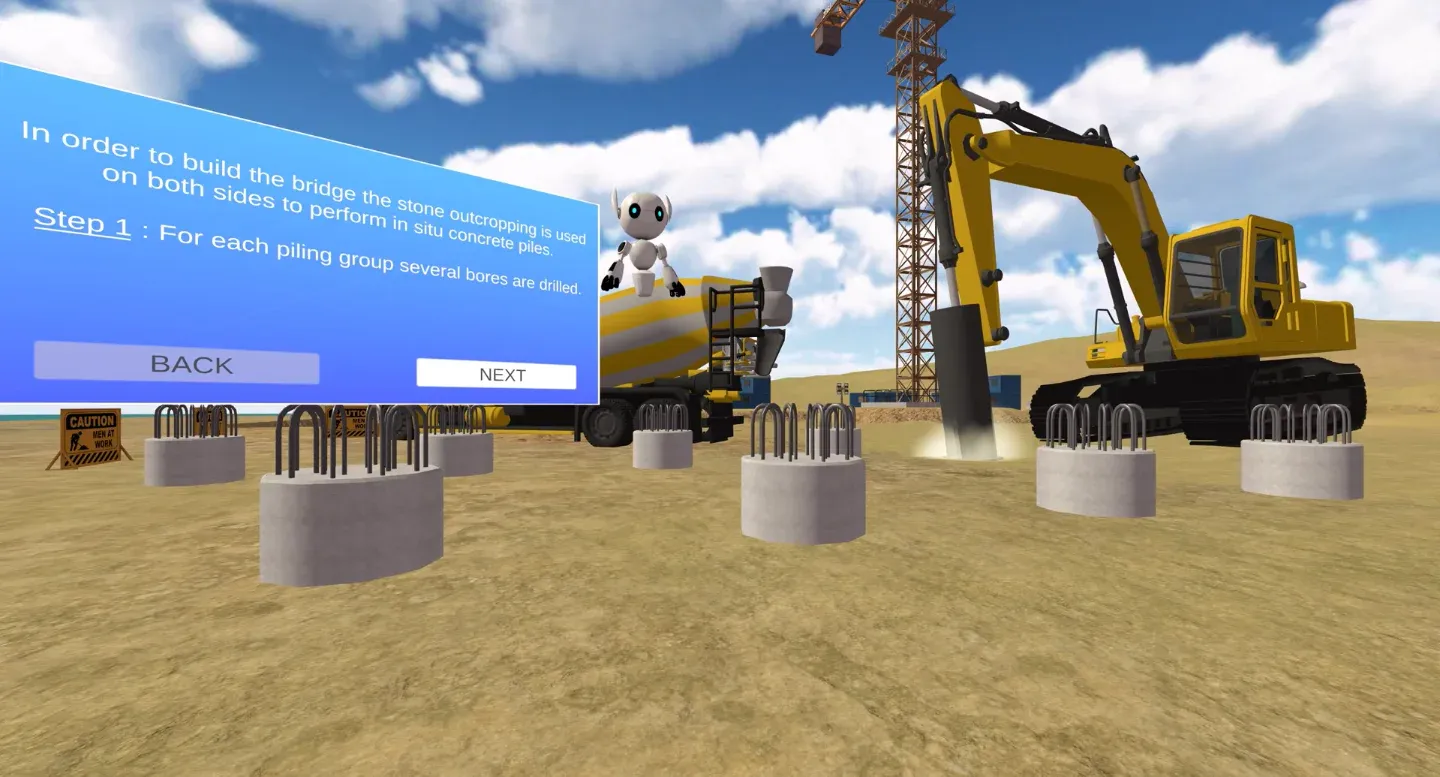
- Bored-pile foundations and pile caps
- Piers and abutments that carry the deck to the ground
- Bearings that transfer load and allow movement
- Girders spanning between the supports
- The deck slab and finished carriageway
- Temporary works and the plant used at each stage
Concepts it makes tangible
- Why construction sequence matters - what can and cannot be built out of order
- Load paths from deck to girders to piers to foundations
- Dead load, live load, and how each element carries force
- The difference between the temporary and permanent structural condition
- How substructure and superstructure work together
How the build unfolds
- Guided Mode walks the correct stage-by-stage sequence
- Self-Explore lets students move between stages at their own pace
- Each stage is tied to the load path it completes
How faculty use it
- Pre-site-visit primer before a real bridge or precast-yard tour
- Flipped classroom - build the bridge at home, analyse behaviour in class
- Revision of construction sequence and load transfer before exams
- Lab-free demonstration where site access is not possible
The 7thi AI tutor sits alongside the whole experience, scaffolding the difficult parts and giving subject-aware answers in context. Built-in assessment lets faculty see, per student, who has grasped which concepts - without grading another paper.
How the module works
The module opens on a virtual construction site where nothing but the ground has been prepared. Students begin at the foundations and work upward, and at each stage the structure only behaves as a real bridge would: a girder placed before its bearings has nowhere to transfer its load, and the module shows that consequence rather than hiding it. Working through bored-pile foundations, pile caps, piers, abutments, bearings, girders and finally the deck slab, students assemble the whole structure and watch it become progressively more stable. Guided Mode enforces the correct order for a first pass; Self-Explore then lets students deliberately break the sequence to test their own understanding of why it exists.
What students take away
By the end, a student can describe the full construction sequence of a girder bridge, explain why each stage depends on the ones before it, and trace a load path from the running surface down through the deck, girders, bearings and piers into the foundations. They can distinguish dead load from live load, explain how bearings both carry force and accommodate movement, and articulate the difference between the temporary condition during construction and the permanent condition in service. These are exactly the judgements a site engineer makes, and they are assessed automatically as the student works.
In the classroom
In a typical civil engineering course, the bridge construction module is used in two ways. Ahead of a site visit, it primes students so that a real bridge or precast yard becomes a place to confirm and extend understanding rather than a first, bewildering encounter. In a flipped-classroom model, students build the bridge before the lecture and arrive already able to discuss why the sequence runs the way it does, so contact time is spent on analysis and design judgement instead of first exposure. It also stands on its own as a lab-free demonstration where site access is impossible, which is the reality for many diploma, polytechnic and distance programmes.
Interactive features and modes
The module offers a Guided Mode that walks the correct construction sequence from foundations to deck, and a Self-Explore mode that lets students move between stages freely to test what can and cannot be built out of order. Load paths can be highlighted and re-run at any stage, the temporary and permanent conditions can be compared directly, and each element can be inspected in isolation. Every interaction is designed to make an invisible idea - how load finds its way to the ground - visible and repeatable.
Why it matters
Bridge construction is one of the clearest demonstrations in civil engineering that order is not arbitrary. On a real project, a single stage out of sequence can mean an element with no load path, an unstable temporary condition, or expensive rework. Yet the sequence is precisely what a site visit cannot show, because any given stage has usually been completed and buried long before a class arrives, and the temporary works that make construction possible are struck and removed as soon as the permanent structure can stand on its own. Teaching this in VR lets every student watch the whole sequence unfold at their own pace, as many times as they need.
The bigger picture
The deeper lesson the module teaches is that a structure has a life before it is finished. During construction, loads travel through the partly built structure and through temporary works along paths that differ from the permanent ones, and the structural condition changes at every stage. Engineers who understand only the completed structure miss the very conditions that most often cause construction failures. By making the temporary condition visible and letting students step through it, the module builds the habit of thinking about buildability and sequence - a habit that separates a designer who can draw a bridge from one who understands how it comes into being.
Devices, deployment and assessment
Deploying the module is straightforward. It runs on Meta Quest, ClassVR and Pico headsets, on WebXR-compatible browsers, and on the desktop without any headset at all, so a department can start with the hardware it already has and scale as it grows. Faculty can assign the whole module or specific scenes, set it as pre-lab preparation or post-lab revision, and track progress on a dashboard that records concepts mastered, time per scene and assessment scores, with export to the LMS via xAPI. The 7thi AI tutor answers student questions in context throughout, so learners are never left stuck and faculty are not fielding the same question forty times.
Who this module is for
- Civil engineering undergraduates and postgraduates studying construction or bridge engineering
- Diploma and polytechnic civil programmes without regular site access
- Faculty preparing a cohort for a bridge or precast-yard site visit
- Departments running construction technology as a lab-free or blended course
Syllabus alignment
Where this module fits.
ABET (United States)
Supports ABET Student Outcomes 1 and 6 - applying engineering knowledge and conducting experimentation. Detailed mapping available on request.
IEAC (United Kingdom)
Aligned with Washington Accord graduate attributes for complex engineering problem-solving and investigation. Detailed mapping available on request.
University syllabi
We map this module to your institution's own construction engineering syllabus before deployment. Request a custom mapping.
NBA (India)
Maps to Course Outcomes in Construction Engineering, contributing to POs around problem-solving and modern tool usage.
Keep exploring
Related modules.
See Bridge Construction live in a demo.
Thirty minutes, the full module, your curriculum questions answered.
What construction stages does the module cover?
Bored-pile foundations and pile caps, piers and abutments, bearings, girders, the deck slab and the finished carriageway - along with the temporary works and plant used at each stage.
How does the module teach load paths?
As each element is placed, the route load takes from deck through girders and bearings into piers and foundations is highlighted. Students see how the path differs between the temporary and permanent condition.
Can students build the bridge out of sequence?
Self-Explore lets them move between stages freely, which is the point: some elements cannot carry load until the ones beneath them exist. Guided Mode enforces the correct order.
Does this replace a real bridge site visit?
It works best before one. Students who already know the sequence and terminology get far more from a site visit, and the module covers stages that are buried or hidden by the time a class arrives.
What prior knowledge do students need?
Foundation-level construction engineering. The module suits Postgraduate and above, including diploma and polytechnic cohorts.
How long is a typical session?
About 45 minutes for a full run including assessment. Students can pause and resume, and faculty can assign specific parts rather than the whole module.
Which headsets does this module run on?
Meta Quest, ClassVR, WebXR, plus any WebXR-compatible browser. It also runs on desktop without a headset, which covers faculty preview and remote cohorts. OpenXR and 6DOF headsets are supported.
Is the assessment graded automatically?
Yes. Scores reach the faculty dashboard immediately, pass thresholds are adjustable, and results export to your LMS via xAPI.